
Field Rules
Setting field rules is the process of defining relationships between fields in your CRM/CSV/XML data and the corresponding fields in Property Hive. It involves creating rules that specify how imported data should be translated and populated into the fields in your Property Hive listings.
This ensures that information such as property details, prices, locations, and descriptions are correctly and accurately imported, maintaining the integrity and usability of your property listings.
If you’re importing from a CRM where the field mapping is already setup by us because we’re aware of the structure of the data, you shouldn't need to add any additional field rules. The 'Field Rules' section does however give you control over overriding any of the default mapping we have in place.
This guide will walk you through the process of setting up and managing field mapping rules to ensure your property data is imported accurately and efficiently.
Accessing field rules
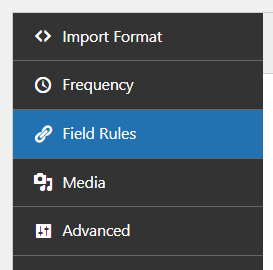
When editing an import you’ll be able to access field rules from the left hand tab:
Create field rules
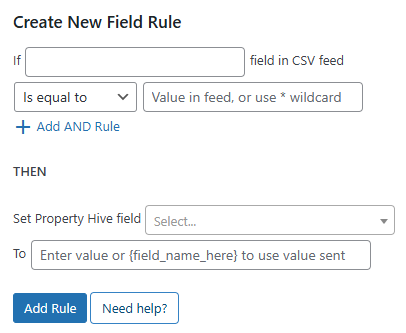
Here you’ll be presented with the ability to create a number of rules using a form like so:
If the format being used is XML or CSV, on the right hand side you’ll have a list of all the fields we found in the external file:
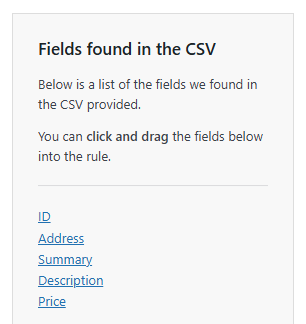
These can be dragged and dropped into the relevant textboxes to aid with creating rules.
If the format being used is a common CRM format and not a bespoke XML or CSV file, you can simply enter the name of the field in the data.
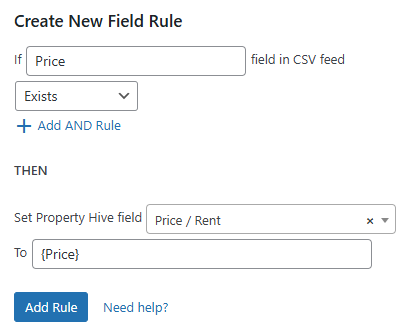
An example of a mapping the price using the list of fields above would be:
If importing from an XML or CSV file you must create a field rule for at least either the post title, post excerpt or post content. Otherwise WordPress will fail to import the property and will write to the logs accordingly.